
Quick description
It was a permissions issue.
More details
The customer was using Acrobat as the viewer for PDFs and requested to open the imposed PDF from our Client application on both Windows and Mac. This is when they got the error messages from Acrobat.
After imposing the job, we perform a move on that imposed PDF file and move it to the appropriate folder for that particular job in the Jobs share. The "Work" folder where the imposition takes place had very tight security (by default). The folders within the K2 Jobs share are not inheriting the share settings of that folder. This move action in Windows does not allow for inheriting security rights. Only a copy does this. In this case, the customer has default security permissions that are very tight. The likelihood that you will have a similar problem is directly related to how tight your IT Department's default permissions are.
Solutions
Two ways forward. Pick your favorite!
1. Change the permissions on the Work folder. You can get to that by clicking on the tray in the Taskbar and, on Impostrip, choose "Open Work Folder.
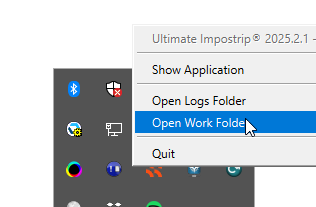
You can also just type %appdata% in a Windows File Explorer window and navigate to the folder.
It's at %Appdata%\Ultimate Technographics\Ultimate Impostrip.
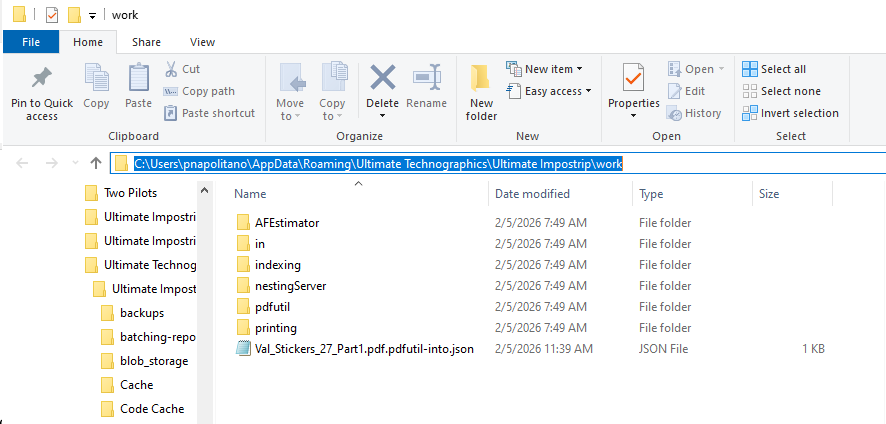
Give everyone who needs it full access to this folder. (Right-click the Work folder and choose Properties. Then choose the Security tab). Then, those permissions will get moved along with the file and everything will work as expected.
2. Force a copy instead of a move. You do this by moving the Jobs share onto a different disk drive. If you are on the same drive as the Appdata directory (the C drive), then you get a move. But if your Jobs share were on (e.g.) the D drive, you would get a copy. Permissions would flow over and, again, you'd get what you expect from Acrobat on Mac or Windows.
How do you move the Jobs share? See the section in this document about "Set System Paths".