
Quick Start: How to Obtain Your Dongle ID and LDK License Information
Use this guide when contacting Xitron for software upgrades, license changes, or licensing support.
Step 1: Obtain the Dongle ID (Security Number)
Open Navigator Server.
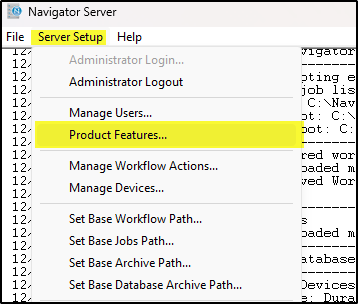
Go to Server Setup and log in as Administrator.
Select Product Features.
You aren't changing anything, so you can ignore this warning and click Yes.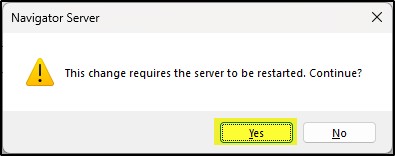
Locate the Security Number.
This number is your dongle ID.
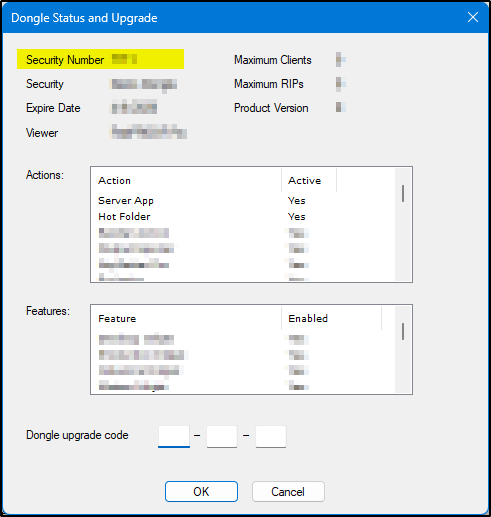
Record the number and close the window.
Step 2: Obtain License Information (If Requested)
On the Navigator system, open:
Click Display Keys.
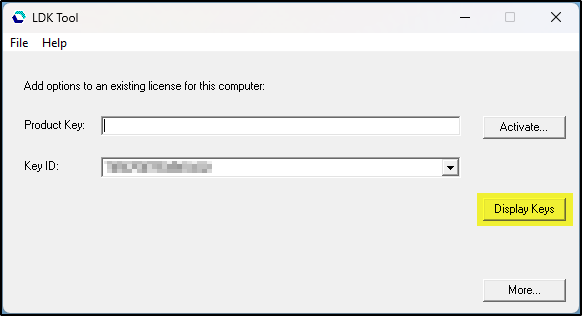
Export license information:
Click Save to generate a license text file.
Step 3: Email the Information to Xitron
Send the following to the appropriate address:
For Upgrades or License Purchases
For Licensing Support
Include:
Your dongle ID (Security Number)
The license text file (if saved)
A brief description of your request or issue
Tips
Send files exactly as generated.
Providing complete information helps avoid delays.